

Proxicam AI cameras

Proxicam AI camera detection, fitted to your trucks and plant

Proxicam's AI cameras pick out people around a vehicle or machine and alert the operator in real time. As an authorised Proxicam reseller, we supply the system, fit it at your yard or site and set it up for how each machine works.

  • Authorised Proxicam reseller
  • Supply, install and set-up
  • Fitted at your yard or site
  • No tags or vests needed
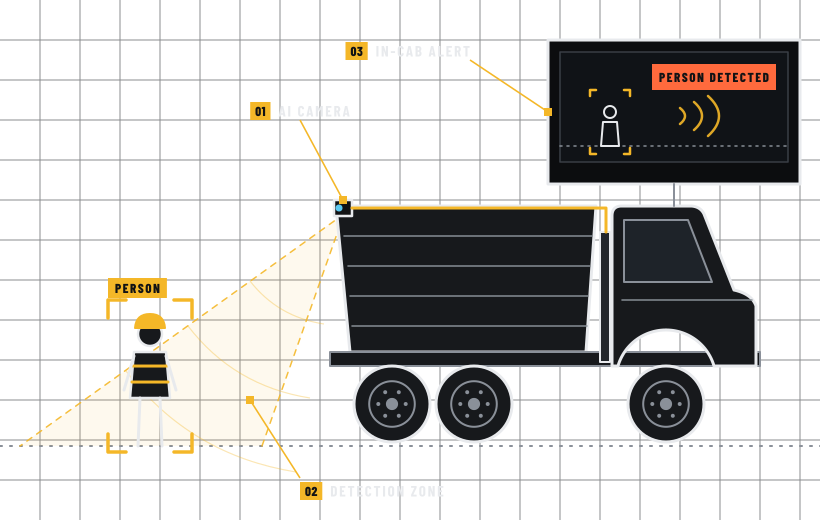
Proxicam AI camerasLine drawing of an AI camera on a reversing tipper detecting a worker and alerting the operator

What Proxicam does

Proxicam is an AI pedestrian detection and proximity warning system, designed and developed in Australia. Its smart cameras are trained to pick out the human form, whether a person is standing still or moving. The processing happens on the camera itself, so there's no separate control box to find room for.

When someone steps into a detection zone, Proxicam warns the operator straight away with visual and audible alerts. Workers don't need to wear RFID tags or special vests for it to work. Proxicam quotes 99.8% detection accuracy, and says that means fewer false alarms.

How the warning reaches the operator

You choose the alert hardware. Proxicam's 7-inch colour monitor gives a live HD feed from up to four cameras, in single, split, triple or quad view. If you'd rather not add a screen, the compact Detection Indicator gives LED and buzzer alerts in the cab, and audible warnings can be a spoken voice or a tone.

Detection zones are set in Proxicam's app on a phone or tablet. Each zone's size, shape, location and offset from the machine can be adjusted, with multi-stage zones and separate alert settings for each. An optional forward and reverse mode only alerts from the camera facing the direction of travel.

Alerts don't have to stay in the cab, either. Proxicam's built-in outputs can trigger sirens, beacons and other warning devices, and we can wire those in during the same install.

Proxicam comes in several configurations, and the right one depends on the machine and how it works. Tell us what you run and we'll recommend a set-up.

Made for dirty, hard-working machines

Proxicam rates its cameras IP69K for water and dust, and builds them with die-cast aluminium bodies and stainless steel mounting hardware. Each camera has a fisheye lens with 170-degree coverage. The monitor is rated IP66 and senses the light around it to dim the screen automatically.

LEDs on each camera show system health, and the boot-up sequence helps with pre-start checks. Proxicam also says detection is always on, turning on automatically whenever the machine is operating.

Supplied, fitted and set up by us

Because we're an authorised Proxicam reseller, the supply, install and set-up all come from one contractor. Cameras are mounted to cover the blind spots that matter on that machine, and the wiring is run, fused and protected like any other auto electrical job we'd put our name to. Proxicam's screw-lock harnesses and plug-and-play connections help keep the install tidy.

Proxicam says it suits virtually all construction and mining machines, and it names everything from excavators, loaders, graders, rollers and bulldozers to dump trucks, haul trucks and tippers. For the fleets we work on, the obvious candidates are:

  • Excavators, rollers and other plant working close to ground crews on civil and earthmoving jobs
  • Tippers and other trucks reversing in tight yards and on site
  • Loaders, haul trucks and heavy gear on mining sites
  • Plant hire machines, fitted at your yard between hires

One layer of protection, not the whole plan

Proxicam helps reduce risk around moving machines, but it works alongside your other controls, not instead of them. Proxicam's own guidance calls detection 'a helpful layer' and one part of your overall control stack. It also says detection doesn't replace separation where that's practicable, or training, supervision and safe work procedures.

So keep your exclusion zones, spotters and site rules in place, and talk to your safety team before changing any of them. For more on where detection fits, read AI camera detection explained.

What's included

What you get

  • Proxicam cameras and alert hardware, supplied by an authorised reseller
  • A look at the machine, how it's used and where its blind spots are
  • One to four cameras mounted to suit the machine
  • Power and signal wiring, fused, protected and neatly routed
  • A monitor or Detection Indicator placed where the operator can see it without blocking the view
  • Detection zones and alerts set up in Proxicam's app
  • Beacons or sirens wired to Proxicam's outputs, if you want them
  • A walk test of every zone before handover
  • An operator walkthrough covering the alerts, the limits and lens cleaning

Who it's for

Industries we do this for

Business and fleet work only

We work on business vehicles and machinery. No private cars, caravans or boats.

How it works

From first call to back at work

  1. 01

    Look at the machine

    We look at the vehicle or plant, how it's used and where people on foot work around it, and note the blind spots that matter.

  2. 02

    Plan and quote

    We work out how many cameras it needs, where they mount and how the operator is alerted, then quote the supply and install.

  3. 03

    Mount and wire

    Cameras go on solid mounts, harnesses are routed and protected, and the monitor or Detection Indicator goes in the cab.

  4. 04

    Set zones and test

    We set the detection zones and alerts in Proxicam's app, then walk through each zone to check the alerts on the machine.

  5. 05

    Show your operators

    Before the machine goes back to work, we take your operators through what the alerts mean, what the system can't see and how to keep the lenses clean.

FAQs

Questions about Proxicam AI cameras

Something not covered here? Call 0400 554 024 and ask.

How much does Proxicam cost?

It depends on the configuration: how many cameras, which alert hardware and any extras. Those include Proxicam's optional DV-Hub, which records continuous and event-based video and data from up to four cameras, and its FleetHQ web portal for event data and reporting, which needs a subscription. Send us an enquiry with what you run and we'll recommend a set-up and quote it.

Can we drop spotters once Proxicam is fitted?

We wouldn't. Proxicam is there to support the operator, and your exclusion zones, spotters and site rules still do the heavy lifting. Talk to your safety team before changing any control.

What happens if a camera gets covered in mud?

Proxicam gives the operator an audible and visual warning if mud, snow or another covering blocks a camera's view. The lenses still need cleaning, so put them on the pre-start, especially on dusty or muddy sites.

Will it go off every time someone walks up to a parked machine?

It doesn't have to. Proxicam's safe-to-approach feature mutes detection alerts when it's triggered by the park brake, a lockout or another hard control. We'll set it up to suit how the machine is used.

Should we fit the whole fleet at once?

Usually not. Start with one or two of the machines that reverse the most and work closest to people on foot. Your operators get to try it in real conditions, and their feedback shapes how we set up the rest.

Can it go in during a fleet fit-out?

Yes. If your trucks are booked in for a fleet vehicle fit-out, Proxicam can go on during the same visit. That saves taking the vehicle off the road twice.

Find out what suits your machines

Tell us what you run and where your ground crews work. We'll recommend the Proxicam configuration that suits and quote the supply and install.

Call Luke0400 554 024
Call 0400 554 024 Get a quote